> ## Documentation Index
> Fetch the complete documentation index at: https://docs.zixflow.com/llms.txt
> Use this file to discover all available pages before exploring further.
# Introduction
> Campaign - Send Email
#### The Leading Email API
Every business requires an email service to handle essential transactional emails and marketing messages, but not all need the extensive marketing features that Zixflow offers. For businesses seeking a more technically-focused email solution at scale, there's the Zixflow API.
#### To Send Messages, Generate the API Key
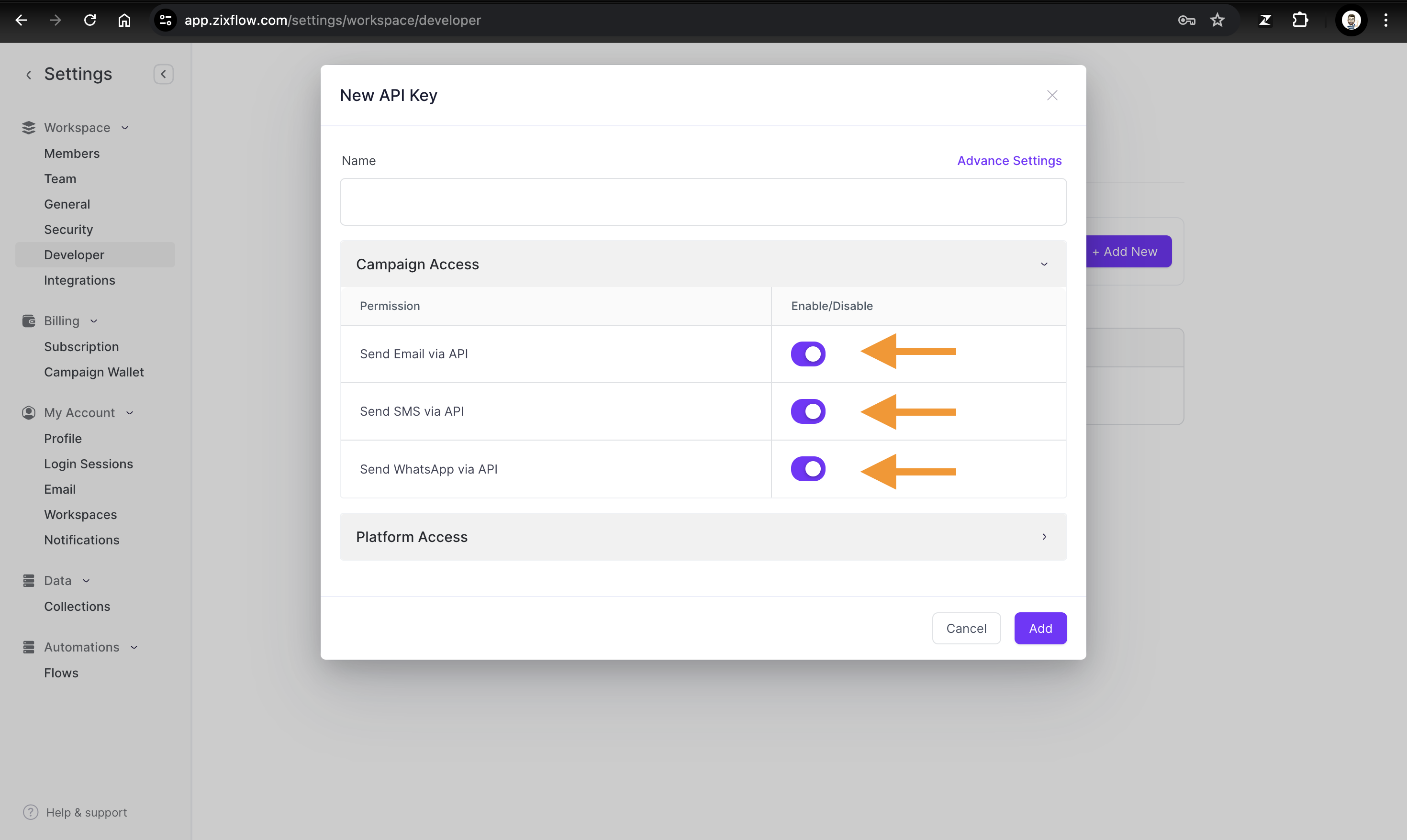
1. Go to Developers under Admin settings at Zixflow Platform - [https://app.zixflow.com/settings/workspace/developer](https://app.zixflow.com/settings/workspace/developer)
 2. Now assign the respective permissions to the channel which you want to give specific or all channels (all channels recommended so you don't have to change the API in the future if you want to use other channels)
 #### Setting Up on Zixflow Platform
To send emails via API, verify your domain and add your footer address details at [https://app.zixflow.com/campaign/settings/email](https://app.zixflow.com/campaign/settings/email). Once setup is complete, you can begin testing the email API.
#### Setting Up on Zixflow Platform
To send emails via API, verify your domain and add your footer address details at [https://app.zixflow.com/campaign/settings/email](https://app.zixflow.com/campaign/settings/email). Once setup is complete, you can begin testing the email API.